💁♂️个人主页:进击的荆棘
👇作者其它专栏:
目录
1.理解“文件”
2.C文件接口
3.系统文件I/O
4.理解“一切皆文件”
5.缓冲区
1.理解“文件”
1.1狭义理解
●文件在磁盘里
●磁盘是永久性存储介质,因此文件在磁盘上的存储是永久性的
●磁盘是外设(既是输出设备也是输入设备)
●磁盘上的文件本质是:对文件的所有操作,都是对外设的输入和输出,检查IO
1.2广义理解
●Linux下一切皆文件(磁盘、显示器、网卡、键盘……都是抽象化的过程)
1.3文件操作的归类认知
●对于0KB的空文件是占用磁盘空间的
●文件是文件属性(元数据)和文件内容的集合(文件=属性(元数据)+内容)
●所有的文件操作本质是文件内容操作和文件属性操作
1.4系统角度
●对文件的操作本质是进程对文件的操作
●磁盘的管理者是操作系统
●文件的读写本质不是通过C/C++的库函数来操作的(这些库函数只是为用户提供方便),而是通过文件相关的系统调用接口来实现的
2.C文件接口
2.1hello.c打开⽂件
1#include <stdio.h>
2
3int main()
4{
5    FILE *fp = fopen("myfile", "w");
6    if(!fp){
7        printf("fopen error!\n");
8    }
9    while(1);
10    fclose(fp);
11    return 0;
12}
13
打开的myfile文件在哪个路径下?
●在程序的当前路径下。系统如何知道程序的当前路径在哪里?
可以使用ls /proc/[进程id] -l命令查看当前正在运行进程的信息:
1[sjx@VM-8-12-centos io]$ ps ajx | grep myProc
2506729 533463 533463 506729 pts/249 533463 R+ 1002 7:45 ./myProc
3536281 536542 536541 536281 pts/250 536541 R+ 1002 0:00 grep --
4color=auto myProc
5[sjx@VM-8-12-centos io]$ ls /proc/533463 -l
6total 0
7......
8-r--r--r-- 1 hyb hyb 0 Aug 26 17:01 cpuset
9lrwxrwxrwx 1 hyb hyb 0 Aug 26 16:53 cwd -> /home/sjx/io
10-r-------- 1 hyb hyb 0 Aug 26 17:01 environ
11lrwxrwxrwx 1 hyb hyb 0 Aug 26 16:53 exe -> /home/sjx/io/myProc
12dr-x------ 2 hyb hyb 0 Aug 26 16:54 fd
13......
其中:
●cwd:指向当前进程运行目录的一个符号链接
●exe:指向启动当前进程的可执行文件(完整路径)的符号链接
打开文件,本质是进程打开,所以进程知道自己在哪里,即使文件不带路径,进程也知道。因此OS就能知道创建的文件放在哪里。
2.2hello.c写文件
1#include <stdio.h>
2#include <string.h>
3
4int main()
5{
6    FILE *fp = fopen("myfile", "w");
7    if(!fp){
8        printf("fopen error!\n");
9    }
10    const char *msg = "hello bit!\n";
11    int count = 5;
12    while(count--){
13        fwrite(msg, strlen(msg), 1, fp);
14    }
15    fclose(fp);
16    return 0;
17}
2.3hello.c读文件
1#include <stdio.h>
2#include <string.h>
3
4int main()
5{
6    FILE *fp = fopen("myfile", "r");
7    if(!fp){
8        printf("fopen error!\n");
9        return 1;
10    }
11    char buf[1024];
12    const char *msg = "hello bit!\n";
13    while(1){
14        //注意返回值和参数,此处有坑,仔细查看man⼿册关于该函数的说明
15        size_t s = fread(buf, 1, strlen(msg), fp);
16        if(s > 0){
17            buf[s] = 0;
18            printf("%s", buf);
19        }
20        if(feof(fp)){
21            break;
22        }
23    }
24    fclose(fp);
25    return 0;
26}
27
在上面的基础实现cat指令:
1#include <stdio.h>
2#include <string.h>
3
4int main(int argc, char* argv[])
5{
6    if (argc != 2)
7    {
8        printf("argv error!\n");
9        return 1;
10    }
11    FILE *fp = fopen(argv[1], "r");
12    if(!fp){
13        printf("fopen error!\n");
14        return 2;
15    }
16    char buf[1024];
17    while(1){
18        int s = fread(buf, 1, sizeof(buf), fp);
19        if(s > 0){
20            buf[s] = 0;
21            printf("%s", buf);
22        }
23        if(feof(fp)){
24            break;
25        }
26    }
27    fclose(fp);
28    return 0;
29}
2.4输出信息到显示器
1#include <stdio.h>
2#include <string.h>
3
4int main()
5{
6    const char *msg = "hello fwrite\n";
7
8    fwrite(msg, strlen(msg), 1, stdout);
9    printf("hello printf\n");
10    fprintf(stdout, "hello fprintf\n");
11
12    return 0;
13}
14
2.5stdin&stdout&stderr
●C默认会打开三个输出流,分别是stdin,stdout,stderr
●这三个流的类型都是FILE*,fopen返回值类型,文件指针
1#include <stdio.h>
2
3extern FILE *stdin;
4extern FILE *stdout;
5extern FILE *stderr;
2.6打开文件的操作
1r  Open text file for reading.
2The stream is positioned at the beginning of the file.
3
4r+ Open for reading and writing.
5The stream is positioned at the beginning of the file.
6
7w Truncate(缩短) file to zero length or create text file for writing.
8The stream is positioned at the beginning of the file.
9
10w+ Open for reading and writing.
11The file is created if it does not exist, otherwise it is truncated.
12The stream is positioned at the beginning of the file.
13
14a Open for appending (writing at end of file).
15The file is created if it does not exist.
16The stream is positioned at the end of the file.
17
18a+ Open for reading and appending (writing at end of file).
19The file is created if it does not exist. The initial file position
20for reading is at the beginning of the file,
21but output is always appended to the end of the file.
22
3.系统文件I/O
打开文件的方式不仅仅是fopen,ifstream等流式,语言层的方案,其实才是系统打开文件最底层的方案。而学习系统文件IO之前,需了解如何给函数传递标志位,该方法在系统文件IO接口中会使用到:
3.1一种传递标志位的方法
1#include <stdio.h>
2
3#define ONE 0001 //0000 0001
4#define TWO 0002 //0000 0010
5#define THREE 0004 //0000 0100
6
7void func(int flags) {
8    if (flags & ONE) printf("flags has ONE! ");
9    if (flags & TWO) printf("flags has TWO! ");
10    if (flags & THREE) printf("flags has THREE! ");
11    printf("\n");
12}
13
14int main() {
15    func(ONE);
16    func(THREE);
17    func(ONE | TWO);
18    func(ONE | THREE | TWO);
19    return 0;
20}
操作文件除了使用语言层的接口,还可以采用系统接口来进行文件访问。
3-2 hello.c写文件
1#include <stdio.h>
2#include <sys/types.h>
3#include <sys/stat.h>
4#include <fcntl.h>
5#include <unistd.h>
6#include <string.h>
7
8int main()
9{
10    umask(0);
11    int fd = open("myfile", O_WRONLY|O_CREAT, 0644);
12    if(fd < 0){
13        perror("open");
14        return 1;
15    }
16    int count = 5;
17    const char *msg = "hello bit!\n";
18    int len = strlen(msg);
19    while(count--){
20        write(fd, msg, len);//fd: 文件描述符, msg:缓冲区⾸地址, len: 本次读取,期望
21写⼊多少个字节的数据。 返回值:实际写了多少字节数据
22    }
23    close(fd);
24    return 0;
25}
26
3.3hello.c读文件
1#include <stdio.h>
2#include <sys/types.h>
3#include <sys/stat.h>
4#include <fcntl.h>
5#include <unistd.h>
6#include <string.h>
7
8int main()
9{
10    int fd = open("myfile", O_RDONLY);
11    if(fd < 0){
12        perror("open");
13        return 1;
14    }
15    const char *msg = "hello bit!\n";
16    char buf[1024];
17    while(1){
18        size_t s = read(fd, buf, strlen(msg));//类⽐write
19        if(s > 0){
20            printf("%s", buf);
21        }else{
22            break;
23        }
24    }
25    close(fd);
26    return 0;
27}
28
3.4接口介绍
open:man open
1#include <sys/types.h>
2#include <sys/stat.h>
3#include <fcntl.h>
4
5int open(const char *pathname, int flags);
6int open(const char *pathname, int flags, mode_t mode);
7
8pathname: 要打开或创建的⽬标⽂件
9flags: 打开⽂件时,可以传⼊多个参数选项,⽤下⾯的⼀个或者多个常量进⾏“或”运算,构成
10flags。
11参数:
12    O_RDONLY: 只读打开
13    O_WRONLY: 只写打开
14    O_RDWR : 读,写打开
15        这三个常量,必须指定⼀个且只能指定⼀个
16    O_CREAT : 若⽂件不存在,则创建它。需要使⽤mode选项,来指明新⽂件的访
17问权限
18    O_APPEND: 追加写
19返回值:
20    成功:新打开的⽂件描述符
21    失败:-1
22
mode_t:在Linux/glibc中,一般被定义为:typedef unsigned int mode_t
open函数具体使用哪个,和具体应用场景相关,若目标文件不存在,需要open创建,则第三个参数标识创建文件的默认权限,否则,使用两个参数的open
write,read,close,lseek,类比C文件相关接口
3.5open函数返回值
在认识返回值之前,得先认识系统调用和库函数
●上面的fopen,fclose,fread,fwrite都是C标准库当中的函数,称之为库函数(libc)
●而open,close,read,write,lseek都属于系统提供接口,称之为系统调用接口
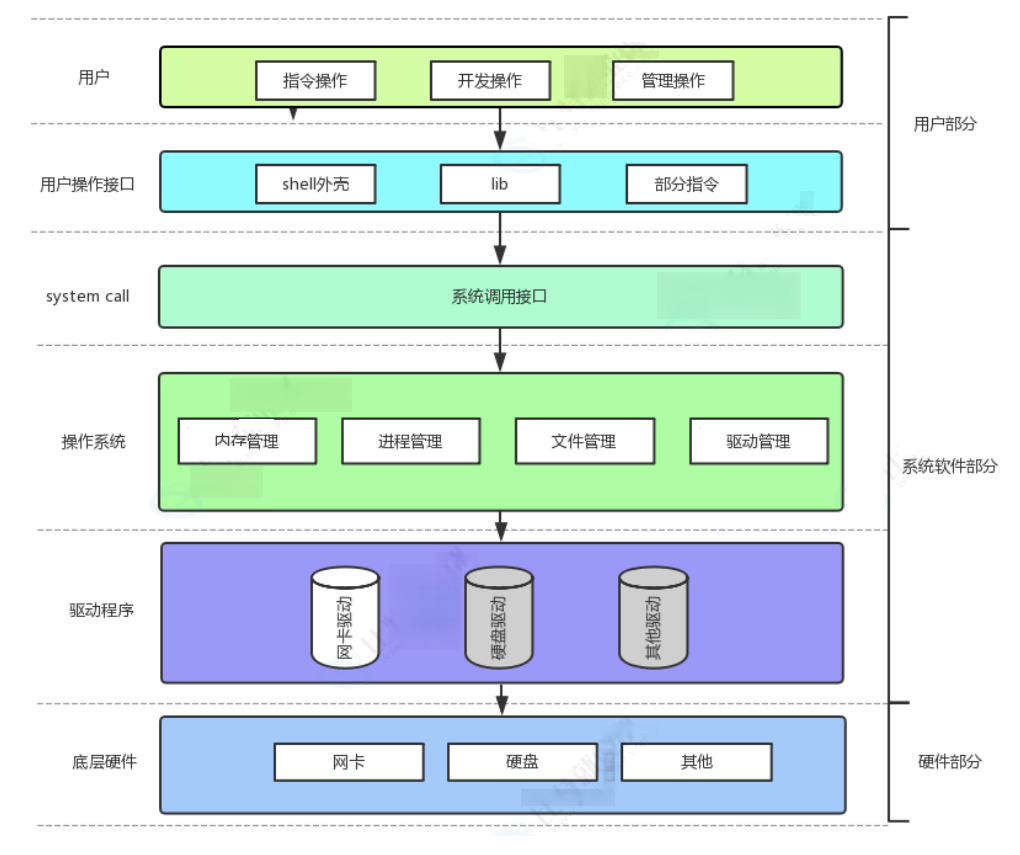
所以,可以认为,f#系列的函数,都是对系统调用的封装,方便二次开发。
3.6文件描述符fd
●通过open,我们知道了文件描述符就是一个小整数
3.6.1 0&1&2
●Linux进程默认情况下会有3个缺省打开的文件描述符,分别是标准输入0,标准输出1,标准错误2
●0,1,2对应的物理设备一般是:键盘,显示器,显示器
所有输入输出还可以采用如下方式:
1#include <stdio.h>
2#include <sys/types.h>
3#include <sys/stat.h>
4#include <fcntl.h>
5#include <string.h>
6
7int main()
8{
9    char buf[1024];
10    size_t s = read(0, buf, sizeof(buf));
11    if(s > 0){
12        buf[s] = 0;
13        write(1, buf, strlen(buf));
14        write(2, buf, strlen(buf));
15    }
16    return 0;
17}
18
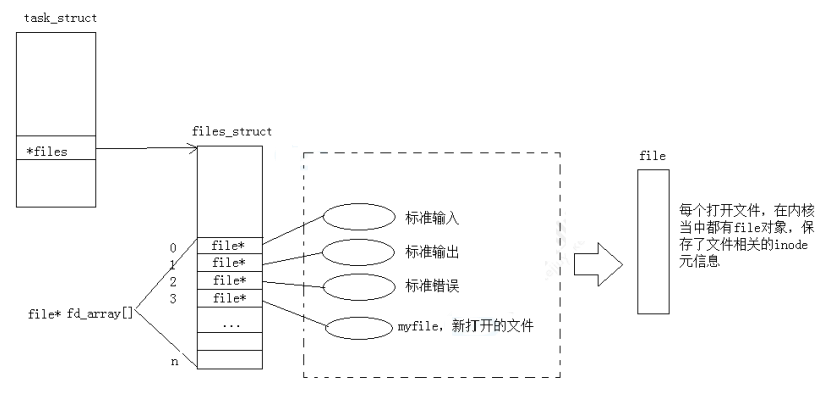
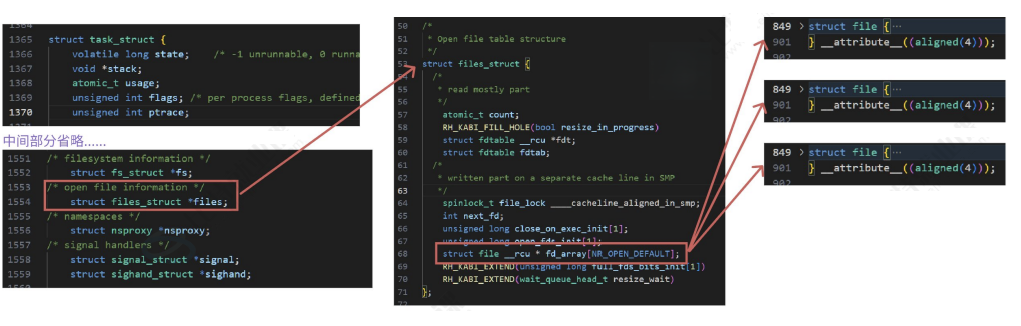
已经知道,文件描述符就是从0开始的小整数。当我们打开文件时,操作系统在内存中要创建相应的数据结构来描述目标文件。于是就有了file结构体。表示一个已经打开的文件对象。而进程执行open系统调用,所以必须让进程和文件关联起来。每个进程都有一个指针*file,指向一张表files_struct,该表最重要的部分就是包含一个指针数组,每个元素都是一个指向打开文件的指针。所以,本质上,文件描述符就是该数组的下标。所以,只要拿着文件描述符,就可以找到对应的文件。
对于以上原理结论可以通过内核源码验证:
首先要找到task_struct结构体在内核中的位置,地址为:/usr/src/kernels/3.1θ.0-1160.71.1.el7.x86_64/include/linux /sched.h (3.10.0-1160.71.1.el7.x86_64是内核版本,可使用uname -a查看服务器配置)
●要查看内容可直接用vs code在windows下打开内核源代码
●相关结构体所在位置
▢struct task_struct : /usr/src/kernels/3.10.0-1160.71.1.el7.x86_64/include/linux/sched.h
▢struct files_struct : /usr/src/kernels/3.10.0-1160.71.1.el7.x86_64/include/linux/fdtable.h
▢struct file : /usr/src/kernels/3.10.0-1160.71.1.el7.x86_64/include/linux/fs.h
3.6.2文件描述符的分配规则
1#include <stdio.h>
2#include <sys/types.h>
3#include <sys/stat.h>
4#include <fcntl.h>
5
6int main()
7{
8    int fd = open("myfile", O_RDONLY);
9    if(fd < 0){
10        perror("open");
11        return 1;
12    }
13    printf("fd: %d\n", fd);
14    close(fd);
15    return 0;
16}
17
输出结果 fd:3
关闭0或2后:
1#include <stdio.h>
2#include <sys/types.h>
3#include <sys/stat.h>
4#include <fcntl.h>
5
6int main()
7{
8    close(0);
9    //close(2);
10    int fd = open("myfile", O_RDONLY);
11    if(fd < 0){
12        perror("open");
13        return 1;
14    }
15    printf("fd: %d\n", fd);
16    close(fd);
17    return 0;
18}
结果为 fd:0后fd:2,可见,文件描述符的分配规则:在files_struct数组中,找到当前没有被使用的最小下标,作为新的文件描述符
3.6.3重定向
若关闭1
1#include <stdio.h>
2#include <sys/types.h>
3#include <sys/stat.h>
4#include <fcntl.h>
5#include <stdlib.h>
6
7int main()
8{
9    close(1);
10    int fd = open("myfile", O_WRONLY|O_CREAT, 00644);
11    if(fd < 0){
12        perror("open");
13        return 1;
14    }
15    printf("fd: %d\n", fd);
16    fflush(stdout);
17    close(fd);
18    exit(0);
19}
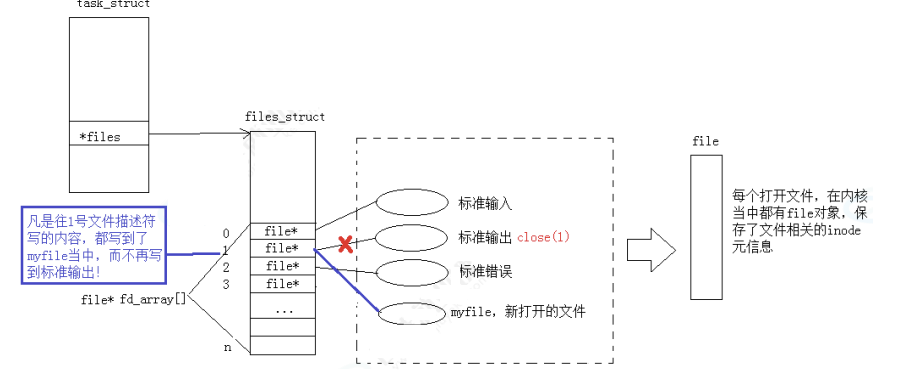
此时,本应输出到显示器上的内容,输出到了文件myfile中,其中,fd=1。这种现象叫做输出重定向。常见的重定向有:>,>>,<
输出重定向的本质:
3.6.4使用dup2系统调用
函数原型:
1#include <unistd.h>
2int dup2(int oldfd, int newfd);
1#include <stdio.h>
2#include <unistd.h>
3#include <fcntl.h>
4int main() {
5    int fd = open("./log", O_CREAT | O_RDWR);
6    if (fd < 0) {
7        perror("open");
8        return 1;
9    }
10    close(1);
11    dup2(fd, 1);
12    for (;;) {
13    char buf[1024] = {0};
14    size_t read_size = read(0, buf, sizeof(buf) - 1);
15    if (read_size < 0) {
16        perror("read");
17        break;
18    }
19    printf("%s", buf);
20    fflush(stdout);
21    }
22    return 0;
23}
24
25
printf是C库中的IO函数,一般往stdout中输出,但是stdout底层访问文件的时候,找的还是fd:1,但此时,fd:1下标所表示的内容,已经变成了myfile的地址,不在是显示器文件的地址,所以,输出的任何消息都会往文件中写入,进而完成输出重定向。
3.6.5在myshell中添加重定向功能
1#include <iostream>
2#include <cstdio>
3#include <stdlib.h>
4#include <string.h>
5#include <unistd.h>
6#include <sys/wait.h>
7#include <sys/types.h>
8#include <sys/stat.h>
9#include <fcntl.h>
10
11#define COMMAND_SIZE 1024
12#define FORMAT "[%s@%s %s]# "
13
14//shell的全局参数
15#define MAXARGC 128
16int g_argc;
17char* g_argv[MAXARGC];
18
19//环境变量参数表
20#define MAX_ENV 100
21char * g_env[MAX_ENV];
22int g_envs;
23
24//for test
25char cwd[1024];
26char cwdenv[1024];
27
28//退出码
29int lastcode=0;
30
31//重定向需要的变量
32#define NONE_REDIR 0
33#define INPUT_REDIR 1   //<
34#define OUTPUT_REDIR 2  //>
35#define APPEND_REDIR 3  //>>
36int redir=NONE_REDIR;
37std::string filename;
38
39const char* GetUser(){
40  const char * user=getenv("USER");
41  return user==NULL?"none":user;
42}
43
44const char* GetHostname(){
45  const char * hostname=getenv("HOSTNAME");
46  return hostname==NULL?"none":hostname;
47}
48
49const char* GetPwd(){
50  //const char * pwd=getenv("PWD");
51  const char * pwd=getcwd(cwd,sizeof(cwd));
52  if(pwd){
53    snprintf(cwdenv,sizeof(cwdenv),"PWD=%s",cwd);
54    putenv(cwdenv);
55  }
56  return pwd==NULL?"none":pwd;
57}
58
59const char * GetHome(){
60  const char *home=getenv("HOME");
61  return home==NULL?"":home;
62}
63
64void InitEnv(){
65  extern char ** environ;
66  memset(g_env,0,sizeof(g_env));
67  g_envs=0;
68  //1.获取环境变量
69  for(int i=0;environ[i];i++){
70    //先为自己的环境变量参数表开辟空间
71    g_env[i]=(char*)malloc(strlen(environ[i])+1);
72    strcpy(g_env[i],environ[i]);
73    g_envs++;
74  }
75
76  g_env[g_envs]=NULL;//最后一个值需要为空
77  //2.导成环境变量
78  for(int i=0;g_env[i];i++){
79    putenv(g_env[i]);
80  }
81  environ=g_env;
82}
83
84std::string DirName(const char* pwd){
85#define SLASH "/"
86  std::string dir=pwd;
87  if(dir==SLASH) return SLASH;
88  auto pos=dir.rfind(SLASH);
89  if(pos==std::string::npos) return "BUG?";
90  return dir.substr(pos+1);
91}
92void MakeCommandLine(char prompt[],int size){
93  snprintf(prompt,size,FORMAT,GetUser(),GetHostname(),DirName(GetPwd()).c_str());
94}
95
96void PrintCommandPrompt(){
97  char prompt[COMMAND_SIZE];
98  MakeCommandLine(prompt,sizeof(prompt));
99  printf("%s",prompt);
100  fflush(stdout);
101}
102
103bool GetCommand(char* command,int size){
104  char *str=fgets(command,size,stdin);
105  if(str==NULL) return false;
106  command[strlen(command)-1]=0;//消除\n
107  if(strlen(command)==0) return false;
108  return true;
109}
110bool CommandPrase(char *command){
111#define SPA " "
112  g_argc=0;
113  g_argv[g_argc++]=strtok(command,SPA);
114  while((bool)(g_argv[g_argc++]=strtok(nullptr,SPA)));
115  //减掉多余的1
116  g_argc--;
117  return g_argc>0?true:false;
118}
119void Cd(){
120  //四种清况 cd    cd -   cd ~   cd XXXNAME
121  if(g_argc==1){
122    std::string home=GetHome();
123    if(home.empty()) return ;
124    chdir(home.c_str());
125  }
126  else{
127    std::string where=g_argv[1];
128    if(where=="-"){
129     //
130    }
131    else if(where=="~"){
132      chdir(getenv("HOME"));
133    }
134    else{
135      chdir(where.c_str());
136    }
137  }
138}
139void Echo(){
140  //三种清况 echo $?   ehco $PATH   echo "XXXXX"
141  if(g_argc==2){
142    std::string opt=g_argv[1];
143    if(opt=="$?"){
144      std::cout<<lastcode<<std::endl;
145      lastcode=0;
146    }
147    else if(opt[0]=='$'){
148      std::string env_name=opt.substr(1);
149      const char* env_value=getenv(env_name.c_str());
150      if(env_value)
151          std::cout<<env_value<<std::endl;
152    }
153    else {
154      std::cout<<opt<<std::endl;
155    }
156  }
157}
158
159bool CheckAndExecIn(){
160  std::string cmd=g_argv[0];
161  if(cmd=="cd"){
162    Cd();
163    return true;
164  }
165  else if(cmd=="echo"){
166    Echo();
167    return true;
168  }
169  return false;
170}
171
172void Execte(){
173  pid_t id=fork();
174  if(id==0){
175    int fd=-1;
176    //判断是否是重定向
177    if(redir==INPUT_REDIR){
178      fd=open(filename.c_str(),O_RDONLY);
179      if(fd<0) exit(1);
180      dup2(fd,0);
181      close(fd);
182    }
183    else if(redir==OUTPUT_REDIR){
184      fd=open(filename.c_str(),O_CREAT|O_WRONLY|O_TRUNC,0666);
185      if(fd<0) exit(2);
186      dup2(fd,1);
187      close(fd);
188    }
189    else if(redir==APPEND_REDIR){
190      fd=open(filename.c_str(),O_CREAT|O_WRONLY|O_APPEND,0666);
191      if(fd<0) exit(2);
192      dup2(fd,1);
193      close(fd);
194    }
195    else {
196
197    }
198    //child
199    execvp(g_argv[0],g_argv);
200    exit(1);
201  }
202  int status=0;
203  //father
204  pid_t rid=waitpid(id,&status,0);
205  if(rid>0){
206    lastcode=WEXITSTATUS(status);
207  }
208}
209
210//void Print(char* command){
211//  printf("%s\n",command);
212//}
213
214void RvSpace(char cmd[],int &end){
215  while(isspace(cmd[end])){
216    end++;
217  }
218}
219void RedirCheck(char cmd[]){
220  redir=NONE_REDIR;
221  filename.clear();
222
223  int start=0;
224  int end=strlen(cmd)-1;
225  while(end>start){
226    if(cmd[end]=='<'){
227      cmd[end++]=0;
228      RvSpace(cmd,end);
229      redir=INPUT_REDIR;
230      filename=cmd+end;
231      break;
232    }
233    else if(cmd[end]=='>'){
234      if(cmd[end-1]=='>'){
235        cmd[end-1]=0;
236        //RvSpace(cmd,end);
237        redir=APPEND_REDIR;
238        //filename=cmd+end;
239        //break;
240      }
241      else{
242        //cmd[end++]=0;
243        //RvSpace(cmd,end);
244        redir=OUTPUT_REDIR;
245        //filename=cmd+end;
246        //break;
247      }
248      cmd[end++]=0;
249      RvSpace(cmd,end);
250      filename=cmd+end;
251      break;
252    }
253    else{
254      end--;
255    }
256  }
257}
258
259int main(){
260  InitEnv();
261  while(true){
262     //1.输出命令行提示符
263     PrintCommandPrompt();
264     //2.获取命令行输入
265     char command[COMMAND_SIZE];
266     if(!GetCommand(command,sizeof(command)))
267       continue;
268     //Print(command);
269
270     //3.重定向检查
271     RedirCheck(command);
272     //printf("redir:%d,filename:%s\n",redir,filename.c_str());
273
274     //4.拆解命令行 "ls -a -l" -> "ls" "-a" "-l"
275     if(!CommandPrase(command))
276       continue;
277     //5.检测并处理内建命令
278     if(CheckAndExecIn())
279       continue;
280     //6.执行替换命令
281     Execte();
282  }
283  return 0;
284}
285
《Linux系统——基础IO(上)》 是转载文章,点击查看原文。