目录
编辑
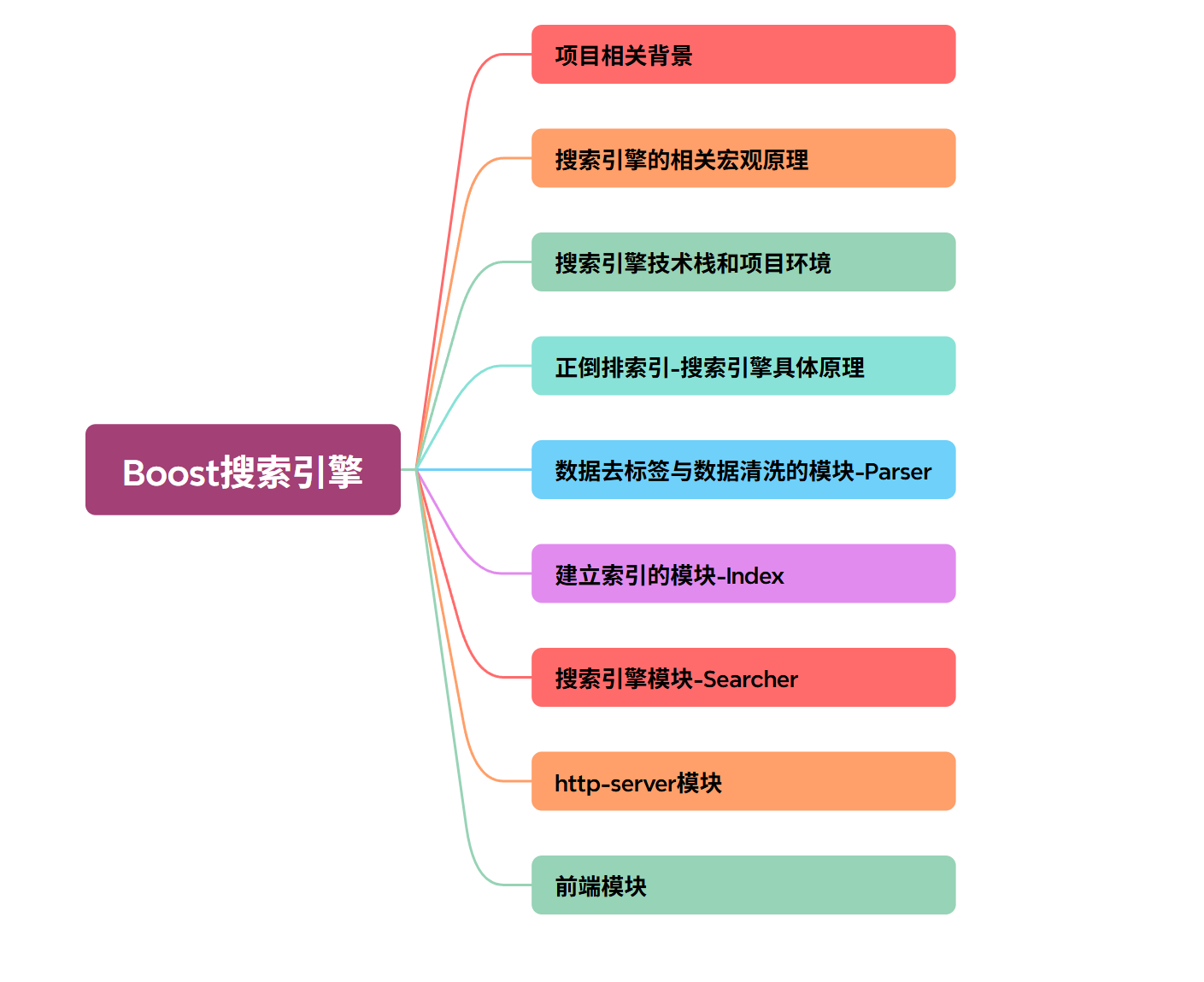
1.项目相关背景
2.搜索引擎的相关宏观原理
3.搜索引擎技术栈和项目环境
4.正倒排索引-搜索引擎具体原理
5.数据去标签与数据清洗模块-Parser
6.建立索引的模块-Index
7.搜索引擎模块-Searcher
8.http-server模块
9.前端模块
gitee源码:新增加boost搜索引擎源码 · cd86251 · XL/gaichihci的学习仓库 - Gitee.com
我们编写完前端网页如下图所示:(只需要服务器连接上,浏览器客户端输入“公网IP:端口号”)

1.项目相关背景
(1)当前已有众多企业推出了各类搜索引擎产品:
百度,搜狗,360搜索,头条新闻客户端........
让我们尝试自行研发这种全网搜索引擎吧,实际上我们很难独立完成。
(2)但简单的站内搜索我们还是可以做到的,好像管中窥豹一样。(Boost官网是没有站内搜索的,需要我们自己来实现一个)
站内搜索相较于大型搜索更加垂直(搜索的内容更相关,相关性更强),数据量更小
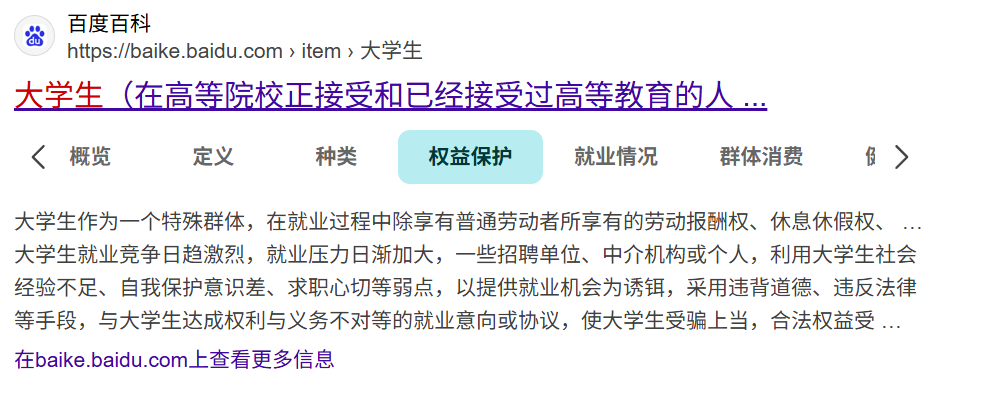
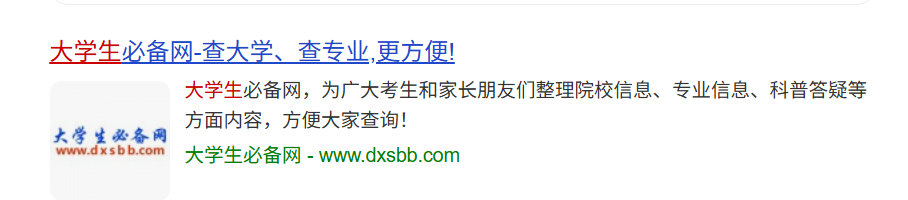
(3) 像主流搜索引擎(如百度、搜狗)的搜索结果通常包含三个核心要素:
- 网页标题
- 内容摘要描述
- 目标网页链接
接下来我们将实现的也是这三类要素。
2.搜索引擎的相关宏观原理
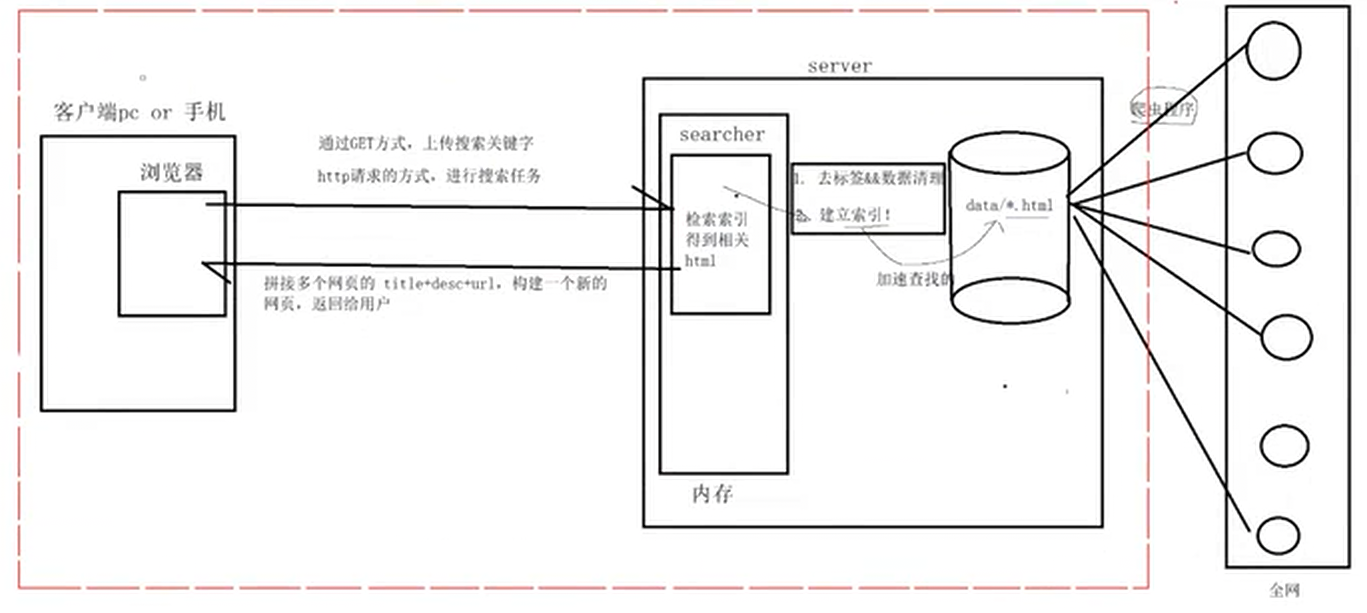
(1)上述红色方框内就是我们接下来要实现的功能
(2)因为上述全网爬虫在我国有点法律风险,在本文就不实现了,把相关数据下载下来就行
3.搜索引擎技术栈和项目环境
· 技术栈: c/c++,c++11,STL,准标准库Boost,jsoncpp,cppjieba,cpp-httplib
(中间我们还会使用到html5,css,js,jQuery,Ajax)
·项目环境:Centos 7云服务器(目前推荐Ubuntu,因为博主Centos 7下有些配置无法现在目前,看个人情况),vim/gcc(g++)/Makefile,vs2019 or vscode
4.正倒排索引-搜索引擎具体原理
实例:
| 文档1:我买了四斤小米 |
|---|
| 文档2:我发布了该吃吃牌手机 |
(1)正排索引:就是从文档ID找到文档内容(文档内的关键字)
| 文档ID | 文档内容 |
|---|---|
| 1 | 我买了四斤小米 |
| 2 | 我发布了该吃吃牌手机 |
然后我们对目标文档进行分词(目的:方便我们进行倒排索引和查找)
| 文档1:我/买/了四斤/小米 |
|---|
| 文档2:我/发布/了/该吃吃牌手机 |
注意:停止词:了,的,吗,a,the,一般我们在分词的时候可以不考虑
(2)倒排索引:根据文档内容,分词,整理不重复的各个关键字,找到文档ID的方案
| 关键字(具有唯一性) | 文档ID,weight(权重) |
|---|---|
| 我 | 文档1,文档2 |
| 买 | 文档1 |
| 发布 | 文档2 |
| 四斤 | 文档1 |
| 小米 | 文档1 |
| 该吃吃牌手机 | 文档2 |
上述weight(权重):后面我们会实现一个简单的权重将搜索出来的,哪些文档排在前面,哪些排在后面
(3)模拟一次简单的查找过程:
用户输入:我-->倒排索引中查找-->提取文档(1,2)-->根据正排索引-->找到文档内容-->title
+content(desc)+url 文档结果进行摘要-->构建响应结果
5.数据去标签与数据清洗模块-Parser
注意:下载最新版boost前请先访问官网获取当前最新版本。后续处理时仅需保留HTML文件。
在开始去除标签前,我们需要先明确目标内容:
boost官网:Boost https://www.boost.org/ //目前在本文内容需要用的是⽬前只需要 boost_1_89_0/doc/html ⽬录下的 html ⽂件,⽤它来进⾏建⽴索引 https://www.boost.org/ //目前在本文内容需要用的是⽬前只需要 boost_1_89_0/doc/html ⽬录下的 html ⽂件,⽤它来进⾏建⽴索引 |
|---|
去标签之前,我们来看看去标签之前的数据
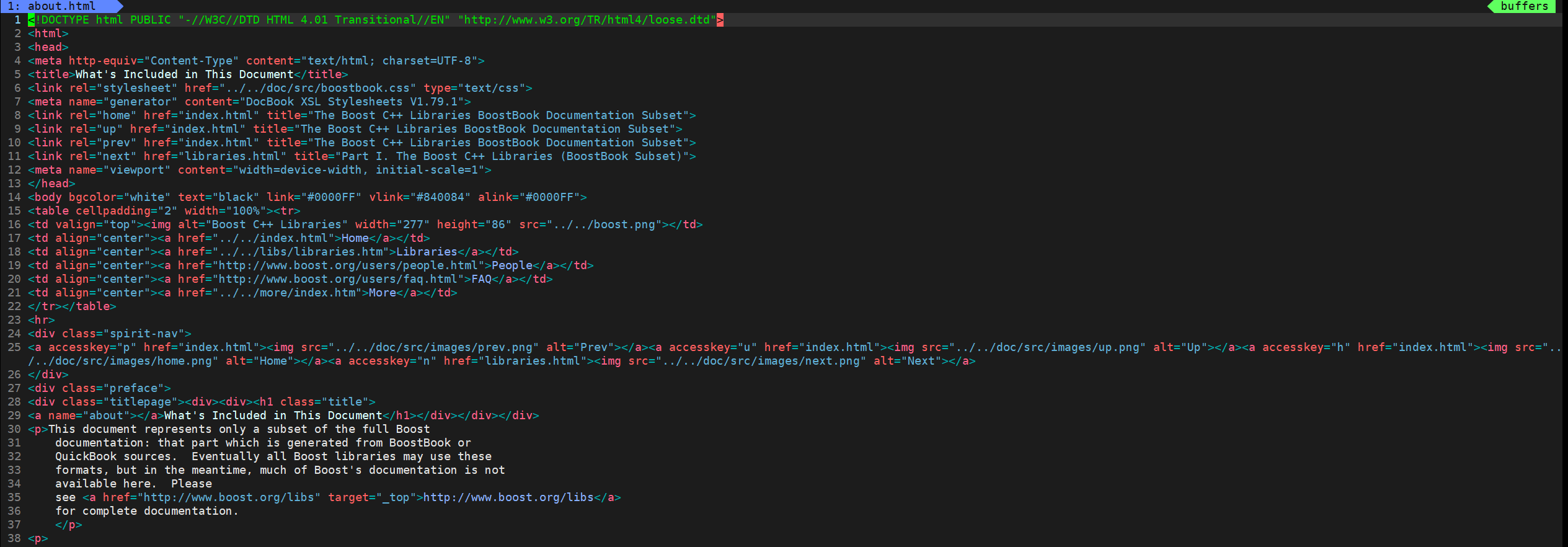
从上图我们可以看到 <> : html 的标签,这个标签对我们进⾏搜索是没有价值的,需要去掉这些标签,⼀般标签都是成对出现的!
去标签:
(1)建立我们需要的文件
首先,我们需要创建一个目录来存放boost搜索引擎项目的所有处理文件。

在本文我们将他命名为boost_searcher
其次,我们创建一个data目录,里面存放处理好的(也就是去完标签的)和没处理好的文件(这里的文件指的是html文件)

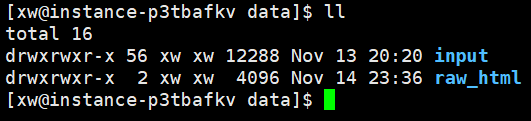
未处理好的html文件放入input中
处理好的html文件存放处:

然后我们需要建立编写parser模块的文件:
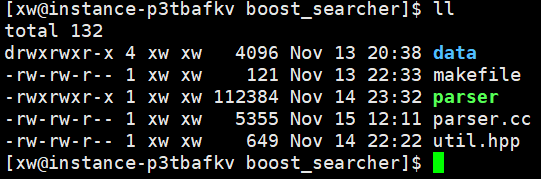
上述util.hpp文件是我们实现一些编写工具的代码
(2)查看makefile文件
boost开发库的安装:
sudo yum install -y boost-devel //是boost 开发库
因为我们在实现parser模块需要使用到boost开发库,所以在编译期间我们需要告知g++我们需要的库文件是什么(注意:-std=c++11中间不能用空格隔开)
1cc = g++
2parser:parser.cc
3	$(cc) -o $@ $^ -lboost_system -lboost_filesystem -std=c++11
4.PHONY:clean
5clean:
6	rm -f parser
7
(3)查看parser.cc文件
1#include <iostream>
2#include <string>
3#include <vector>
4#include <boost/filesystem.hpp>
5#include "util.hpp"
6//是一个目录,下面存放的是html网页
7const std::string src_path = "data/input";
8//存放去标签后的html网页的目录
9const std::string output = "data/raw_html/raw.txt";
10
11typedef struct DocInfo
12{
13  std::string title;//文档标题
14  std::string content;//文档内容
15  std::string url;//该文档在官网中的url
16}DocInfo_t;
17
18bool EnumFile(const std::string &src_path,std::vector<std::string> * files_list);
19bool ParseHtml(const std::vector<std::string> &files_list,std::vector<DocInfo> *results);
20bool SaveHtml(const std::vector<DocInfo> &results,const std::string &output);
21
22int main()
23{
24  std::vector<std::string> files_list;
25  //递归式的把每个html文件名带路径,保存到files_list中,方便后期一个一个文件的读取
26  if(!EnumFile(src_path,&files_list))
27  {
28    std::cout<<"enum file name error"<<std::endl;
29    return 1;
30  }
31  //按照files_list读取每个文件内容,并进行解析
32  std::vector<DocInfo_t> results;
33  if(!ParseHtml(files_list,&results))
34  {
35    std::cout<<"Parse html error"<<std::endl;
36    return 2;
37  }
38  //将解析完的各个文件内容,写入到output,按照\3作为每个文档的分隔符
39  if(!SaveHtml(results,output))
40  {
41    std::cout<<"save html error"<<std::endl;
42    return 3;
43  }
44  return 0;
45}
46
47bool EnumFile(const std::string &src_path,std::vector<std::string> * files_list)
48{
49  namespace fs = boost::filesystem;
50  fs::path root_path(src_path);
51  if(!fs::exists(root_path))
52  {
53    std::cerr<<src_path<<"not exists"<<std::endl;
54    return false;
55  }
56  //定义一个空的迭代器,用来判断递归结束
57  fs::recursive_directory_iterator end;
58  for(fs::recursive_directory_iterator iter(root_path);iter!=end;iter++)
59  { //判断文件是否为普通文件,因为html文件都是普通文件
60    if(!fs::is_regular_file(*iter))
61    {
62      continue;
63    }
64    //判断文件路径名后缀是否满足
65    if(iter->path().extension()!=".html")
66    {
67      continue;
68    }
69    //当前的路径一定是一个合法的,且以html结尾的普通文件
70    //测试: std::cout<<"debug:"<<iter->path().string()<<std::endl;
71    files_list->push_back(iter->path().string());//将所有文件带路径的html保留在files_list,以便后续文本分析
72  }
73
74
75  return true;
76}
77
78bool ParserTitle(const std::string &file,std::string *title)
79{
80  std::size_t begin = file.find("<title>");
81  if(begin == std::string::npos)
82  {
83    return false;
84  }
85  std::size_t end = file.find("</title>");
86  if(end == std::string::npos)
87  {
88    return false;
89  }
90  begin += std::string("<title>").size();
91  if(begin>end)
92  {
93    return false;
94  }
95  *title+=file.substr(begin,end-begin);
96  return true;
97}
98bool Parsercontent(const std::string &file,std::string *content)
99{ //去标签,基于一个简单的状态机
100  enum status
101  {
102    LABLE,
103    CONTENT
104  };
105  enum status s = LABLE;
106  for(char c:file)
107  {
108  switch(s)
109  {
110    case LABLE:
111      if(c == '>') s = CONTENT;
112      break;
113    case CONTENT:
114      if(c == '<') s = LABLE;
115      else{
116        if(c == '\n') c = ' ';//我们这里不保留'\n',因为我们后面要'\n'作为html解析之后文本的分隔符
117        content->push_back(c);
118      }
119      break;
120    default:
121      break;
122  }
123  }
124
125  return true;
126}
127bool ParserUrl(const std::string &file_path,std::string *url)
128{
129  std::string url_head = "https://www.boost.org/doc/libs/1_89_0/doc/html";
130  std::string url_tail = file_path.substr(src_path.size());
131  *url = url_head + url_tail;
132  return true;
133}
134//void Showdug(const DocInfo_t &doc)
135//{
136//std::cout<<"title:"<<doc.title<<std::endl;
137//std::cout<<"content:"<<doc.content<<std::endl;
138//std::cout<<"url:"<<doc.url<<std::endl;
139//}
140bool ParseHtml(const std::vector<std::string> &files_list,std::vector<DocInfo> *results)
141{
142  for(const std::string &file : files_list)
143  {
144    //读取文件,read();
145    std:: string result;
146    if(!ns_util::FileUtil::ReadFile(file,&result))
147    {
148      continue;
149    }
150    DocInfo_t doc;
151    //解析指定文件,提取title
152    if(!ParserTitle(result,&doc.title))
153    {
154      continue;
155    }
156    //解析指定文件,提取content
157    if(!Parsercontent(result,&doc.content))
158    {
159      continue;
160    }
161    //解析指定的文件路径,构建url
162    if(!ParserUrl(file,&doc.url))
163    {
164      continue;
165    }
166    //完成了文档的解析任务,当前文档的相关结果都保存在了doc中
167    results->push_back(std::move(doc));//细节todo:本质会发生拷贝,效率比较低
168
169    //for dubug
170    // Showdug(doc);
171
172  }
173  return true;
174}
175bool SaveHtml(const std::vector<DocInfo> &results,const std::string &output)
176{
177#define SEP '\3'
178  //以二进制的方式写入(最大的好处是写入什么文档里保存的就是什么,文本不会做自动转化)
179  std::ofstream out(output,std::ios::out | std::ios::binary);
180  if(!out.is_open())
181  {
182    std::cerr<<"open"<<output<<"failed"<<std::endl;
183    return false;
184  }
185  for(auto &item : results)
186  {
187    std::string out_string;
188    out_string = item.title;
189    out_string += SEP;
190    out_string += item.content;
191    out_string += SEP;
192    out_string += item.url;
193    out_string += '\n';
194    out.write(out_string.c_str(),out_string.size());
195  }
196  out.close();
197  return true;
198}
199
(4)编写util.hpp文件
1#pragma once
2#include <iostream>
3#include <string>
4#include<fstream>
5namespace ns_util
6{
7  class FileUtil
8  { public:
9    static bool ReadFile(const std::string &files_path,std::string *out)
10    {
11      std::ifstream in(files_path,std::ios::in);
12      if(!in.is_open())
13      {
14        std::cerr<<files_path<<"open error"<<std::endl;
15        return false;
16      }
17      std::string line;
18      while(std::getline(in,line))//有一个关键点就是getline返回是一个流的引用,这里是因为本质进行了重载强制类型转换,才得以可以用作循环判断
19      {
20        *out+=line;
21      }
22      in.close();
23      return true;
24    }
25  };
26}
27
写入文件时,务必考虑后续读取操作的便捷性。
建议采用以下格式: title\3content\3url\n title\3content\3url\n title\3content\3url\n...
这种结构化格式既方便使用getline(ifstream, line)一次性读取整个文档,又能保持数据字段的清晰分隔。
6.建立索引的模块-Index
展示一下index.hpp所有基本代码(后面再进行逐一讲解):
1#pragma once
2#include <iostream>
3#include "log.hpp"
4#include <fstream>
5#include <string>
6#include <vector>
7#include <mutex>
8#include <unordered_map>
9#include "util.hpp"
10namespace ns_index
11{
12  struct DocInfo{
13    std::string title;//文档标题
14    std::string content;//文档去标签后的内容
15    std::string url;//官网文档url
16    uint64_t doc_id;//文档ID
17  };
18  struct InvertedElem{
19    std::string word;
20    uint64_t doc_id;
21    int weight;
22  };
23  typedef std::vector<InvertedElem> InvertedList;//倒排拉链
24
25  class Index
26  {
27    private:
28      //正排索引的数据结构用数组,数组的下标就是文档ID
29      std::vector<DocInfo> forward_index;
30      //倒排索引是一个关键字和一个(一组)倒排拉链对应(关键字和倒排拉链建立映射关系)
31      std::unordered_map<std::string,InvertedList> inverted_index;
32
33    private:
34      Index(){}//一定要有函数体,不能delete
35      Index(const Index&) = delete;
36      Index& operator=(const Index&) = delete;
37
38
39      static Index *instance;
40      static std::mutex mtx;
41    public:
42      ~Index(){
43
44      }
45    public:
46      static Index * GetInstance()
47      {
48        if(instance == nullptr)
49        {
50          mtx.lock();
51          if(instance ==nullptr)
52          {
53            instance = new Index();
54          }
55          mtx.unlock();
56        }
57        return instance;
58      }
59      //根据doc_id找到文档内容
60      DocInfo * GetForwardIndex(uint64_t doc_id)
61      {
62        if(doc_id >= forward_index.size())
63        {
64          std::cerr<<"doc_id out range err"<<std::endl;
65          return nullptr;
66        }
67        return &forward_index[doc_id];
68      }
69      //根据关键字string,获得倒排拉链
70      InvertedList * GetInvertedList(std::string word)
71      {
72        auto iter = inverted_index.find(word);
73        if(iter == inverted_index.end())
74        {
75          std::cerr<<word<<"have no invertedlist"<<std::endl;
76          return nullptr;
77        }
78
79        return &(iter->second);
80      }
81      //根据去标签后格式化的文档,构建正排索引和倒排索引
82      bool BuildIndex(const std::string &input)//parser处理完毕后的数据
83      {
84        std::ifstream in(input,std::ios::in | std::ios::binary);
85        if(!in.is_open())
86        {
87          std::cerr<<input<<"open err"<<std::endl;
88          return false;
89        }
90        std::string line;
91        int count = 0;
92        while(std::getline(in,line))
93        {
94          DocInfo *doc = BuildFwardIndex(line);
95          if(doc == nullptr)
96          {
97            std::cerr<<"build"<<line<<"err"<<std::endl;
98            continue;
99          }
100          BuildInvertedIndex(*doc);
101          count++;
102          if(count%50 == 0)
103          {
104           // std::cout<<"当前建立索引文档"<<count<<std::endl;
105		   LOG(NORMAL, "当前的已经建立的索引文档: " + std::to_string(count));
106          }
107        }
108        return true;
109      }
110    private:
111      DocInfo * BuildFwardIndex(const std::string &line)
112      {
113        //解析line,字符串切分
114        std::vector<std::string> result;
115        const std::string sep = "\3";
116        ns_util::StringUtil::Split(line,&result,sep);
117        if(result.size()!=3)
118        {
119          std::cerr<<"cut"<<line<<"err"<<std::endl;
120          return nullptr;
121        }
122        //将字符串进行填充
123        DocInfo doc;
124        doc.title = result[0];
125        doc.content = result[1];
126        doc.url = result[2];
127        doc.doc_id = forward_index.size();
128        //插入正排索引的vector
129        forward_index.push_back(doc);
130        return &forward_index.back();
131      }
132      bool BuildInvertedIndex(const DocInfo &doc)
133      {
134        struct word_cnt
135        {
136          int title_cnt;
137          int content_cnt;
138          word_cnt():title_cnt(0),content_cnt(0){}
139        };
140        //用来缓存词频的映射表
141        std::unordered_map<std::string,word_cnt> word_map;
142        //对标题进行分词
143        std::vector<std::string> title_word;
144        ns_util::JiebaUtil::CutString(doc.title,&title_word);
145        for(auto s : title_word)
146        {
147          boost::to_lower(s);
148          word_map[s].title_cnt++;
149        }
150        //对文档内容进行分词
151        std::vector<std::string> content_word;
152        ns_util::JiebaUtil::CutString(doc.content,&content_word);
153        for(auto s : content_word)
154        {
155          boost::to_lower(s);
156          word_map[s].content_cnt++;
157        }
158#define X 10
159#define Y 1
160        for(auto &word_pair:word_map)
161        {
162          InvertedElem item;
163          item.doc_id = doc.doc_id;
164          item.word = word_pair.first;
165          item.weight = X*word_pair.second.title_cnt+Y*word_pair.second.content_cnt;
166          InvertedList &inverted_List = inverted_index[word_pair.first];
167          inverted_List.push_back(std::move(item));
168
169        }
170        return true;
171      }
172  };
173    Index *Index::instance = nullptr;
174    std::mutex Index::mtx;
175}
工具util:(这里就先全部展示出来,因为本博主没有边做项目,边编写博客,只能麻烦一下xd,到时候查看用目录跳转一下或者其他方法)
1#pragma once
2#include <iostream>
3#include <string>
4#include <fstream>
5#include <vector>
6#include <boost/algorithm/string.hpp>
7#include "cppjieba/Jieba.hpp"
8namespace ns_util
9{
10  class FileUtil
11  { public:
12    static bool ReadFile(const std::string &files_path,std::string *out)
13    {
14      std::ifstream in(files_path,std::ios::in);
15      if(!in.is_open())
16      {
17        std::cerr<<files_path<<"open error"<<std::endl;
18        return false;
19      }
20      std::string line;
21      while(std::getline(in,line))//有一个关键点就是getline返回是一个流的引用,这里是因为本质进行了重载强制类型转换,才得以可以用作循环判断
22      {
23        *out+=line;
24      }
25      in.close();
26      return true;
27    }
28  };
29
30  class StringUtil
31  {
32    public:
33      static void Split(const std::string &line,std::vector<std::string> *result,const std::string &sep)
34      {
35        boost::split(*result,line,boost::is_any_of(sep),boost::token_compress_on);
36      }
37  };
38
39  const char* const DICT_PATH = "./dict/jieba.dict.utf8";
40  const char* const HMM_PATH = "./dict/hmm_model.utf8";
41  const char* const USER_DICT_PATH = "./dict/user.dict.utf8";
42  const char* const IDF_PATH = "./dict/idf.utf8";
43  const char* const STOP_WORD_PATH = "./dict/stop_words.utf8";
44  class JiebaUtil
45  {
46    private:
47      static cppjieba::Jieba jieba;
48    public:
49            static void CutString(const std::string &src,std::vector<std::string> *out)
50            {
51              jieba.CutForSearch(src,*out);
52            }
53  };
54   cppjieba::Jieba JiebaUtil::jieba(DICT_PATH,HMM_PATH,USER_DICT_PATH, IDF_PATH, STOP_WORD_PATH);
55}
1.让我们首先构建索引数据的基本框架。
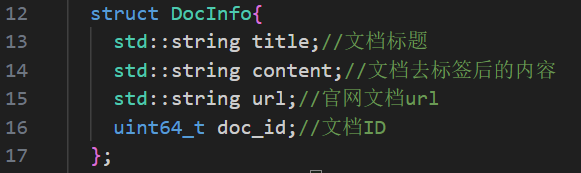
2.第二步当然是建立我们的正排索引和倒排索引

(1)这里我们将一组数据(InvertedElem)用vector存储起来就像拉链一样,我们就简称倒排拉链,最后构成倒排索引的一部分
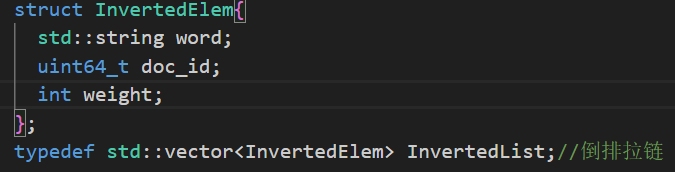
(2)为便于后续使用,我们改用typedef定义

3.正常的析构和构造函数是对象生命周期管理的基本机制。在C++中,构造函数在对象创建时自动调用,而析构函数在对象销毁时自动调用。然而在某些情况下,比如处理频繁访问的索引文件时,这种自动机制会导致性能问题。
以index.hpp为例,如果每次访问都自动构造索引,会导致以下问题:
- 重复初始化开销
- 内存资源浪费
- 潜在的性能瓶颈
为解决这个问题,我们可以实现单例模式,具体步骤如下:
- 将构造函数设为私有,防止外部直接实例化
- 提供静态的GetInstance方法作为唯一访问点
- 在该方法中实现懒加载逻辑:
- 首次调用时构造实例
- 后续调用返回已存在的实例
- 同时要注意线程安全,所以我们加入了入互斥锁保护数据。
示例实现代码框架:
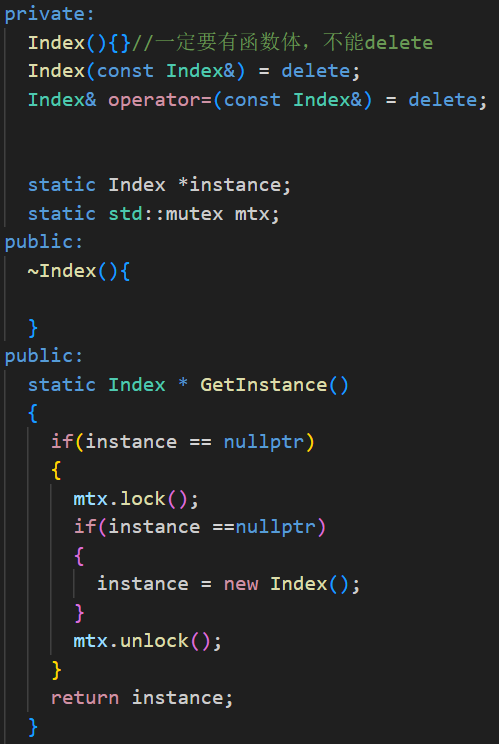
注意:这里静态成员初始化要在类外初始化,否则会报错!!!
4. 在代码中间部分,我已经添加了详细的注释,这里就不再逐行解释了。下面重点说明一下关键实现:我们使用to_lower函数将所有搜索代码转为小写,这样做的目的是为了统一统计权重,并实现搜索关键词的大小写不敏感。需要注意的是,后续在searcher.hpp文件中,我们也需要将搜索到的关键词转为小写形式进行匹配。
最后定义的X和Y是权重(在标题出现就*X,在内容出现就*Y)
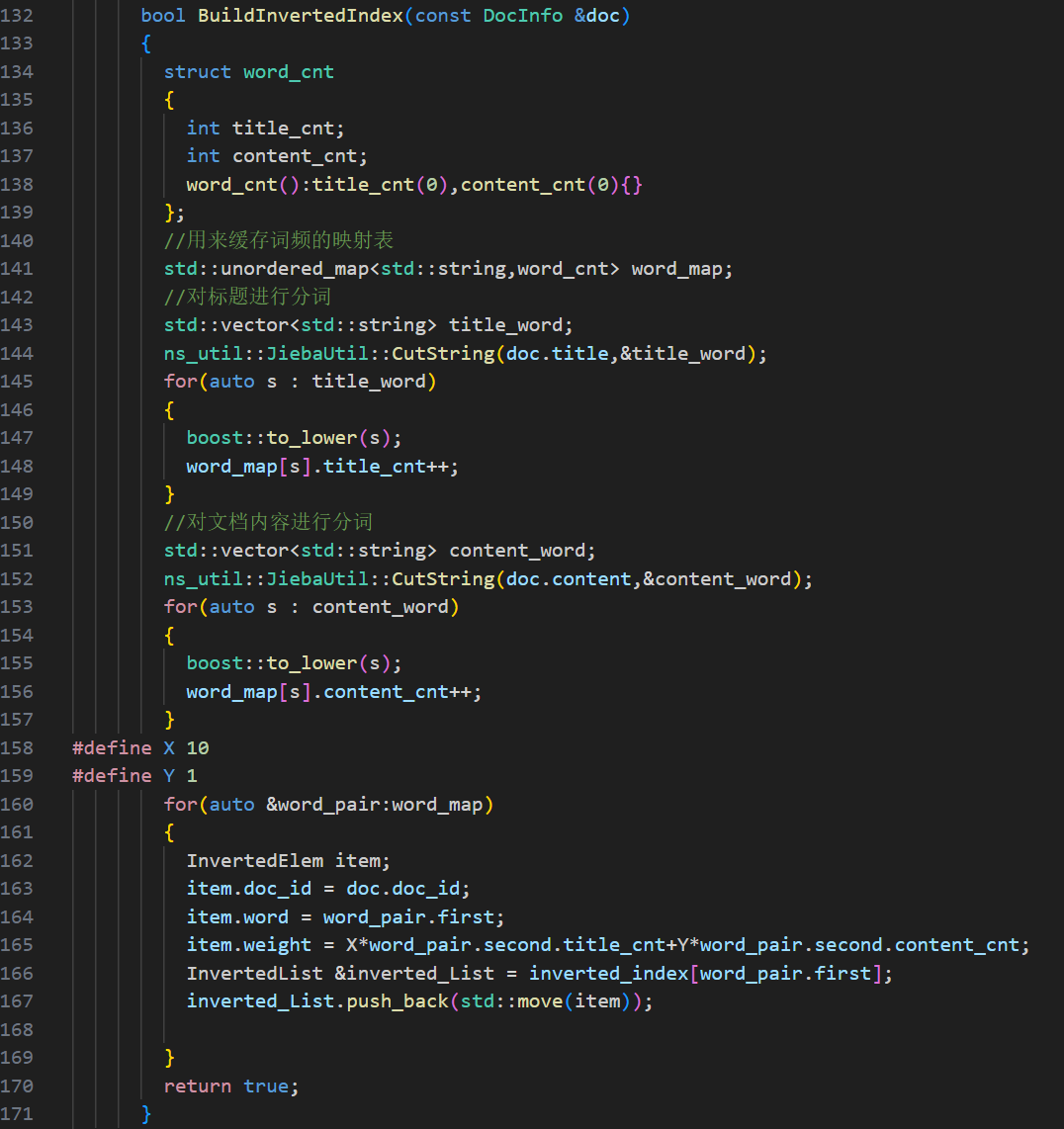
注意:这里我们引入了cppjieba库,安装包需要自己去gitee去搜索这里就不提供了
这个cppjieba库我们只用了下面两个文件一个是dict,一个是cppjieba,这里我们用了软连接将其链接在了本目录下,专门用了threadpart目录来保存本项目使用的各种库


7.搜索引擎模块-Searcher
依旧老样子先展示正文代码:
1#pragma once
2#include "index.hpp"
3#include "util.hpp"
4#include <algorithm>
5#include "log.hpp"
6#include <jsoncpp/json/json.h>
7namespace ns_searcher
8{
9	struct InvertedElemPrint{
10		uint64_t doc_id;
11		int weight;
12		std::vector<std::string> words;
13		InvertedElemPrint():doc_id(0),weight(0){}
14	};
15  class Searcher{
16    private:
17      ns_index::Index *index;//共系统查找的索引
18    public:
19      Searcher(){}
20      ~Searcher(){}
21    public:
22      void InitSearcher(const std::string &input)
23      {
24        //获取或者创建index对象
25        index = ns_index::Index::GetInstance();
26        //std::cout<<"获取单例索引成功"<<std::endl;
27		LOG(NORMAL, "获取index单例成功...");
28        //根据index对象建立索引
29        index->BuildIndex(input);
30        // std::cout<<"建立索引成功"<<std::endl;
31		LOG(NORMAL, "建立正排和倒排索引成功...");
32      }
33      //query:搜索关键字
34      //json_string:返回给用户浏览器的搜索结果
35      void Search(const std::string &query,std::string *json_string)
36      {
37        std::vector<std::string> words;
38        //1.[分词]:对我们query进行按照searcher的要求进行分词
39        ns_util::JiebaUtil::CutString(query,&words);
40        //2.[触发]:就是根据分词的各个“词,进行index查找
41       // ns_index::InvertedList inverted_list_all;
42		std::vector<InvertedElemPrint> inverted_list_all;
43		std::unordered_map<uint64_t,InvertedElemPrint> tokens_map;
44        for(std::string word : words)
45        {
46          boost::to_lower(word);
47          ns_index::InvertedList *inverted_list = index->GetInvertedList(word);
48          if(nullptr == inverted_list)
49          {
50            continue;
51          }
52		  for(const auto &elem : *inverted_list)
53		  {
54		  auto &item = tokens_map[elem.doc_id];
55		  item.doc_id = elem.doc_id;
56		  item.weight +=elem.weight;
57		  item.words.push_back(elem.word);
58		  }
59          //这里将我们所有的去重后的倒排拉链放在inverted_list_all中,方便进行后续排序
60		  for(const auto &item : tokens_map)
61		  {
62		  inverted_list_all.push_back(std::move(item.second));
63		  }
64
65         // inverted_list_all.insert(inverted_list_all.end(),inverted_list->begin(),inverted_list->end());
66        }
67        //3.[合并排序]:汇总查找结果,按照相关性(weight)降序排序
68        std::sort(inverted_list_all.begin(),inverted_list_all.end(),[](const InvertedElemPrint &e1,const InvertedElemPrint &e2){
69                return e1.weight>e2.weight;
70            });
71
72        //4.[构建]:根据查找出来的结果,构建json串--jsoncpp
73        Json::Value root;
74        for(auto &item: inverted_list_all)
75        {
76          ns_index::DocInfo *doc = index->GetForwardIndex(item.doc_id);
77          if(nullptr == doc)
78          {
79            continue;
80          }
81          Json::Value elem;
82          elem["title"] = doc->title;
83          elem["desc"] = GetDesc(doc->content,item.words[0]);
84          elem["url"] = doc->url;
85          root.append(elem);
86        }
87        Json::FastWriter writer;
88        *json_string = writer.write(root);
89      }
90      std::string GetDesc(const std::string &html_content,const std::string &word)
91      {
92        int prev_step = 50;
93        int next_step = 100;
94        //找到首次出现word
95        //因为find搜索是不全部按照小写进行搜索的,所以这里我们用search来进行搜索
96        auto iter = std::search(html_content.begin(),html_content.end(),word.begin(),word.end(),[](int x, int y){
97            return std::tolower(x) == std::tolower(y);
98            });
99        if(iter == html_content.end())
100        {
101          return "NONE1";
102        }
103        int pos = std::distance(html_content.begin(),iter);
104        //获取start,end
105
106        int start = 0;
107        int end = html_content.size()-1;
108        //size_t是一个无符号整形所以在加减的时候一定要注意!!!!(重点)
109        //为了更加简便我们将其全部从size_t用int来替换
110        if(pos > start+prev_step) start = pos-prev_step;
111        if(pos <end-next_step) end = pos+next_step;
112
113       //截取字符串
114        if(start>=end)
115        {
116          return "NONE2";
117        }
118		std::string desc = html_content.substr(start,end - start);
119        desc+="...";
120		return desc;
121      }
122  };
123
124}
125
1.采用这种 words 结构的设计是为了解决实际问题。如果仅用 word 而非 vector 存储,我们在实践中发现检索结果会出现大量重复文档的情况,即在倒排拉链上存在多个相同文档的问题。
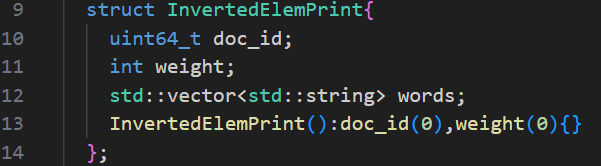
具体应用在search函数:
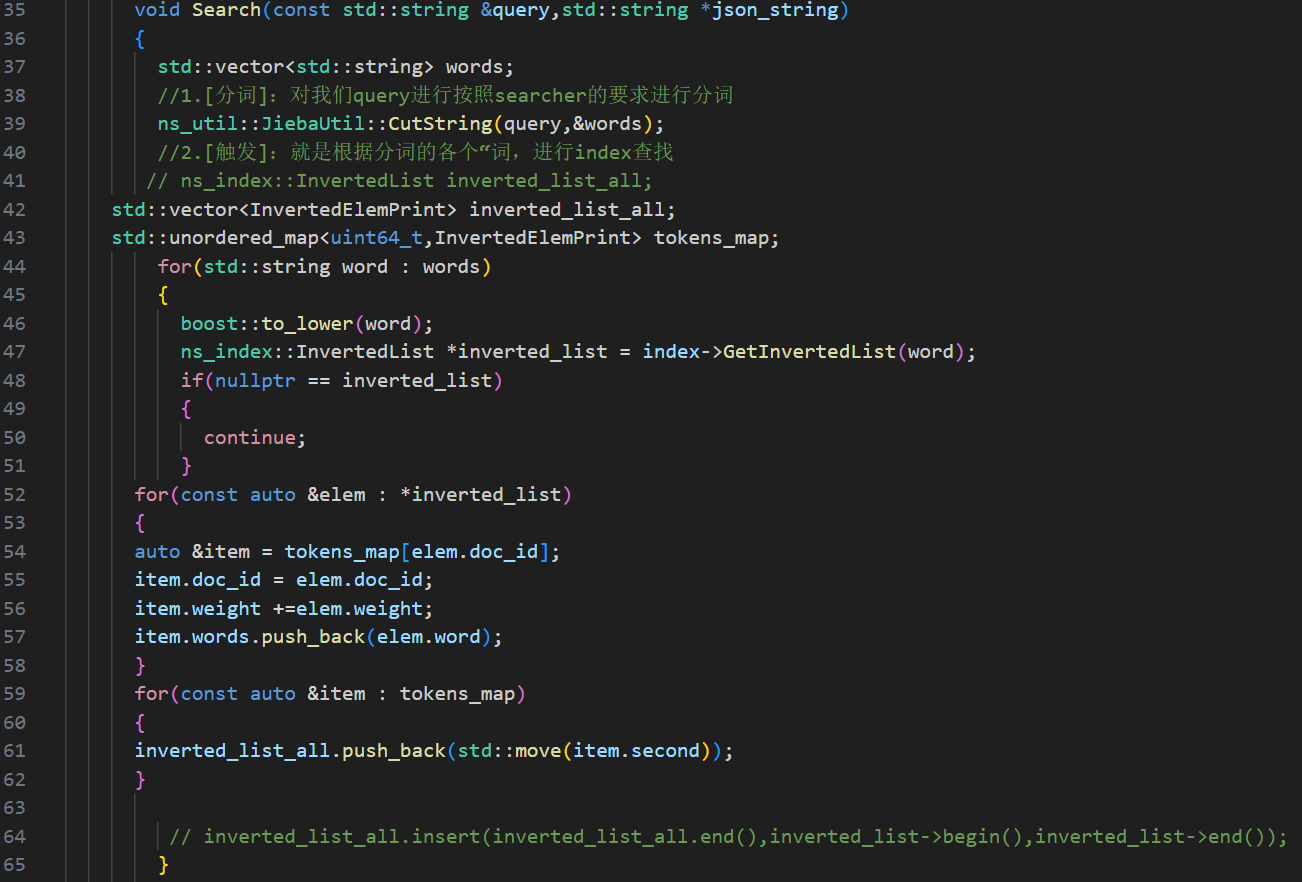
我们定义了一个tokens_map,通过遍历倒排索引链(其中可能包含重复文档)来重新计算权重。对于相同文档,我们累加其权重值,同时保持文档ID不变。重复文档的关键字会被收集到一个vector中存储,这样既实现了去重目的,又保留了完整的索引信息。
这里就体现了我们上述结构体的关键!!!
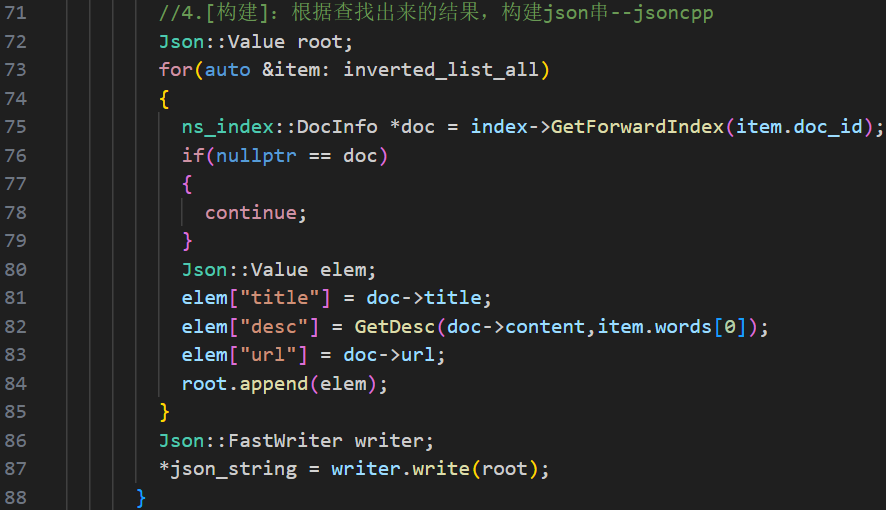
2.下图的构建desc的内容是正文的一部分(具体我们可以随便搜索一下浏览器都是标题,正文的一部分...)
关键在于我们采用了Json库实现文档的序列化和反序列化处理。具体安装时,只需在Gitee平台搜索Jsoncpp即可下载相应的库文件。
用来测试searcher:debug的测试代码:
1#include "searcher.hpp"
2#include <iostream>
3#include <cstring>
4#include <string>
5#include <cstdio>
6
7const std::string input = "data/raw_html/raw.txt";
8
9int main()
10{
11  //for text
12  ns_searcher::Searcher *search = new ns_searcher::Searcher();
13  search->InitSearcher(input);
14  std::string query;
15  std::string json_string;
16  while(true)
17  {
18    //在这里我们使用cin会以空格为分隔符一个一个输出,我们想要的字符串整体一起输出
19    std::cout<<"Please Enter You Search Query#";
20    char buffer[1024];
21    fgets(buffer,sizeof(buffer)-1,stdin);
22    buffer[strlen(buffer)-1] = 0;
23    query = buffer;
24    search->Search(query,&json_string);
25    std::cout<<json_string<<std::endl;
26  }
27  return 0;
28}
8.http-server模块
正文展示:
1#include "searcher.hpp"
2#include "cpp-httplib/httplib.h"
3
4const std::string input = "data/raw_html/raw.txt";
5const std::string root_path = "./wwwroot";
6
7int main()
8{
9	ns_searcher::Searcher search;
10	search.InitSearcher(input);
11
12	httplib::Server svr;
13	svr.set_base_dir(root_path.c_str());
14	svr.Get("/s",[&search](const httplib::Request &req,httplib::Response &rsp){
15			if(!req.has_param("word"))
16			{
17			rsp.set_content("必须要有搜索关键字!","text/plain;charset=utf-8");
18			return;
19			}
20			std::string word = req.get_param_value("word");
21			std::cout<<"用户在搜索:"<<word<<std::endl;
22			std::string json_string;
23			search.Search(word,&json_string);
24			rsp.set_content(json_string,"text/plain;charset=utf-8");
25			});
26        	svr.listen("0.0.0.0",8081);
27  return 0;
28}
29
makefile:
1PARSER=parser
2DUG=debug
3HTTP_SERVER=http_server
4cc = g++
5
6.PHONY:all
7all:$(PARSER) $(DUG) $(HTTP_SERVER)
8
9$(PARSER):parser.cc
10	$(cc) -o $@ $^ -lboost_system -lboost_filesystem -std=c++11
11$(DUG):debug.cc
12	$(cc) -o $@ $^ -ljsoncpp -std=c++11
13$(HTTP_SERVER):http_server.cc
14	$(cc) -o $@ $^ -ljsoncpp -lpthread -std=c++11
15
16.PHONY:clean
17clean:
18	rm -f $(PARSER) $(DUG) $(HTTP_SERVER)
19
(1)建议使用cpp-httplib库时注意:该库需要较新版本的GCC编译器,而CentOS 7系统默认安装的GCC 4.8.5版本可能无法满足要求。(原因:⽤⽼的编译器,要么编译不通过,要么直接运⾏报错)
(2)访问网页时,请在地址栏输入"公网IP:端口号(本示例使用8081)"。此时页面将仅显示由svr.set_base_dir(root_path.c_str())函数提供的网页内容,这些网页文件存储在我们的wwwroot目录下。从这里开始,我们需要使用前端语言来完善网页功能,而后端部分的开发到这里就基本完成了。
日志相关代码如下图:(本文就简单展示一下日志内容)
1#pragma once
2
3#include <iostream>
4#include <string>
5#include <ctime>
6
7#define NORMAL  1
8#define WARNING 2
9#define DEBUG   3
10#define FATAL   4
11
12#define LOG(LEVEL, MESSAGE) log(#LEVEL, MESSAGE, __FILE__, __LINE__)
13
14void log(std::string level, std::string message, std::string file, int line)
15{
16    std::cout << "[" << level << "]" << "[" << time(nullptr) << "]" << "[" << message << "]" << "[" << file << " : " << line << "]" << std::endl;
17}
18
9.前端模块
本文前端语言仅展示代码,具体就不讲解了:(这里我们是用vscode编写的)
1<!DOCTYPE html>
2<html lang="en">
3<head>
4    <meta charset="UTF-8">
5    <meta http-equiv="X-UA-Compatible" content="IE=edge">
6    <meta name="viewport" content="width=device-width, initial-scale=1.0">
7    <script src="https://code.jquery.com/jquery-3.7.1.min.js"></script>
8
9    <title>boost 搜索引擎</title>
10    <style>
11        /* 去掉网页中的所有的默认内外边距,html的盒子模型 */
12        * {
13            /* 设置外边距 */
14            margin: 0;
15            /* 设置内边距 */
16            padding: 0;
17        }
18        /* 将我们的body内的内容100%和html的呈现吻合 */
19        html,
20        body {
21            height: 100%;
22        }
23        /* 类选择器.container */
24        .container {
25            /* 设置div的宽度 */
26            width: 800px;
27            /* 通过设置外边距达到居中对齐的目的 */
28            margin: 0px auto;
29            /* 设置外边距的上边距,保持元素和网页的上部距离 */
30            margin-top: 15px;
31        }
32        /* 复合选择器,选中container 下的 search */
33        .container .search {
34            /* 宽度与父标签保持一致 */
35            width: 100%;
36            /* 高度设置为52px */
37            height: 52px;
38        }
39        /* 先选中input标签, 直接设置标签的属性,先要选中, input:标签选择器*/
40        /* input在进行高度设置的时候,没有考虑边框的问题 */
41        .container .search input {
42            /* 设置left浮动 */
43            float: left;
44            width: 600px;
45            height: 50px;
46            /* 设置边框属性:边框的宽度,样式,颜色 */
47            border: 1px solid black;
48            /* 去掉input输入框的有边框 */
49            border-right: none;
50            /* 设置内边距,默认文字不要和左侧边框紧挨着 */
51            padding-left: 10px;
52            /* 设置input内部的字体的颜色和样式 */
53            color: #CCC;
54            font-size: 14px;
55        }
56        /* 先选中button标签, 直接设置标签的属性,先要选中, button:标签选择器*/
57        .container .search button {
58            /* 设置left浮动 */
59            float: left;
60            width: 150px;
61            height: 52px;
62            /* 设置button的背景颜色,#4e6ef2 */
63            background-color: #4e6ef2;
64            /* 设置button中的字体颜色 */
65            color: #FFF;
66            /* 设置字体的大小 */
67            font-size: 19px;
68            font-family:Georgia, 'Times New Roman', Times, serif;
69        }
70        .container .result {
71            width: 100%;
72        }
73        .container .result .item {
74            margin-top: 15px;
75        }
76
77        .container .result .item a {
78            /* 设置为块级元素,单独站一行 */
79            display: block;
80            /* a标签的下划线去掉 */
81            text-decoration: none;
82            /* 设置a标签中的文字的字体大小 */
83            font-size: 20px;
84            /* 设置字体的颜色 */
85            color: #4e6ef2;
86        }
87        .container .result .item a:hover {
88            text-decoration: underline;
89        }
90        .container .result .item p {
91            margin-top: 5px;
92            font-size: 16px;
93            font-family:'Lucida Sans', 'Lucida Sans Regular', 'Lucida Grande', 'Lucida Sans Unicode', Geneva, Verdana, sans-serif;
94        }
95
96        .container .result .item i{
97            /* 设置为块级元素,单独站一行 */
98            display: block;
99            /* 取消斜体风格 */
100            font-style: normal;
101            color: green;
102        }
103    </style>
104</head>
105<body>
106    <div class="container">
107        <div class="search">
108            <input type="text" value="请输入搜索关键字">
109            <button onclick="Search()">搜索一下</button>
110        </div>
111        <div class="result">
112            <!-- 动态生成网页内容 -->
113            <!-- <div class="item">
114                <a href="#">这是标题</a>
115                <p>这是摘要这是摘要这是摘要这是摘要这是摘要这是摘要这是摘要这是摘要这是摘要这是摘要这是摘要这是摘要这是摘要这是摘要这是摘要</p>
116                <i>https://search.gitee.com/?skin=rec&type=repository&q=cpp-httplib</i>
117            </div>
118            <div class="item">
119                <a href="#">这是标题</a>
120                <p>这是摘要这是摘要这是摘要这是摘要这是摘要这是摘要这是摘要这是摘要这是摘要这是摘要这是摘要这是摘要这是摘要这是摘要这是摘要</p>
121                <i>https://search.gitee.com/?skin=rec&type=repository&q=cpp-httplib</i>
122            </div>
123            <div class="item">
124                <a href="#">这是标题</a>
125                <p>这是摘要这是摘要这是摘要这是摘要这是摘要这是摘要这是摘要这是摘要这是摘要这是摘要这是摘要这是摘要这是摘要这是摘要这是摘要</p>
126                <i>https://search.gitee.com/?skin=rec&type=repository&q=cpp-httplib</i>
127            </div>
128            <div class="item">
129                <a href="#">这是标题</a>
130                <p>这是摘要这是摘要这是摘要这是摘要这是摘要这是摘要这是摘要这是摘要这是摘要这是摘要这是摘要这是摘要这是摘要这是摘要这是摘要</p>
131                <i>https://search.gitee.com/?skin=rec&type=repository&q=cpp-httplib</i>
132            </div>
133            <div class="item">
134                <a href="#">这是标题</a>
135                <p>这是摘要这是摘要这是摘要这是摘要这是摘要这是摘要这是摘要这是摘要这是摘要这是摘要这是摘要这是摘要这是摘要这是摘要这是摘要</p>
136                <i>https://search.gitee.com/?skin=rec&type=repository&q=cpp-httplib</i>
137            </div> -->
138        </div>
139    </div>
140    <script>
141        function Search(){
142            // 是浏览器的一个弹出框
143            // alert("hello js!");
144            // 1. 提取数据, $可以理解成就是JQuery的别称
145            let query = $(".container .search input").val();
146            console.log("query = " + query); //console是浏览器的对话框,可以用来进行查看js数据
147
148            //2. 发起http请求,ajax: 属于一个和后端进行数据交互的函数,JQuery中的
149            $.ajax({
150                type: "GET",
151                url: "/s?word=" + query,
152                success: function(data){
153                    console.log(data);
154                    BuildHtml(data);
155                }
156            });
157        }
158
159        function BuildHtml(data){
160            // 获取html中的result标签
161            let result_lable = $(".container .result");
162            // 清空历史搜索结果
163            result_lable.empty();
164
165            for( let elem of data){
166                // console.log(elem.title);
167                // console.log(elem.url);
168                let a_lable = $("<a>", {
169                    text: elem.title,
170                    href: elem.url,
171                    // 跳转到新的页面
172                    target: "_blank"
173                });
174                let p_lable = $("<p>", {
175                    text: elem.desc
176                });
177                let i_lable = $("<i>", {
178                    text: elem.url
179                });
180                let div_lable = $("<div>", {
181                    class: "item"
182                });
183                a_lable.appendTo(div_lable);
184                p_lable.appendTo(div_lable);
185                i_lable.appendTo(div_lable);
186                div_lable.appendTo(result_lable);
187            }
188        }
189    </script>
190</body>
191</html>


